

本文摘要通过三层交换机来处理 VLAN 间路由,可以节省防火墙上的资源,同时提升网络访问性能。三层交换机负责 VLAN 间路由 + DHCP,OPNsense 只做出口、防火墙、NAT。VLAN 地址参数如下:VLAN用途网段网关10管理192.168.10.0/24192.168.10.120办公192.168.20.0/24192.168.20.130IoT192.168.30.0/24192.168...
通过三层交换机来处理 VLAN 间路由,可以节省防火墙上的资源,同时提升网络访问性能。三层交换机负责 VLAN 间路由 + DHCP,OPNsense 只做出口、防火墙、NAT。
VLAN 地址参数如下:
| VLAN | 用途 | 网段 | 网关 |
|---|---|---|---|
| 10 | 管理 | 192.168.10.0/24 | 192.168.10.1 |
| 20 | 办公 | 192.168.20.0/24 | 192.168.20.1 |
| 30 | IoT | 192.168.30.0/24 | 192.168.30.1 |
| 99 | 上联 OPNsense | 192.168.99.0/30 | 192.168.99.1 |
下面为配置过程。
交换机配置
交换机为华为 S5735S-L32ST4X-A,其他类型交换机可以参考。
1. 创建 VLAN 和 SVI
system-view
vlan batch 10 20 30 99
interface Vlanif10
description VLAN10-MGMT
ip address 192.168.10.1 255.255.255.0
dhcp select global
interface Vlanif20
description VLAN20-OFFICE
ip address 192.168.20.1 255.255.255.0
dhcp select global
interface Vlanif30
description VLAN30-IOT
ip address 192.168.30.1 255.255.255.0
dhcp select global
interface Vlanif99
description UPLINK-OPNSENSE
ip address 192.168.99.1 255.255.255.252
2. 启用 DHCP
启用 DHCP Server(全局):
dhcp enableVLAN 配置 DHCP 地址池:
ip pool VLAN10_POOL
network 192.168.10.0 mask 255.255.255.0
gateway-list 192.168.10.1
dns-list 223.5.5.5 8.8.8.8
excluded-ip-address 192.168.10.1 192.168.10.50
lease day 7
ip pool VLAN20_POOL
network 192.168.20.0 mask 255.255.255.0
gateway-list 192.168.20.1
dns-list 223.5.5.5 8.8.8.8
excluded-ip-address 192.168.20.1 192.168.20.50
lease day 7
ip pool VLAN30_POOL
network 192.168.30.0 mask 255.255.255.0
gateway-list 192.168.30.1
dns-list 223.5.5.5 8.8.8.8
excluded-ip-address 192.168.30.1 192.168.30.50
lease day 7
3. 添加接入端口
interface GigabitEthernet0/0/1
description MGMT-PC
port link-type access
port default vlan 10
interface GigabitEthernet0/0/2
description OFFICE-PC
port link-type access
port default vlan 20
interface GigabitEthernet0/0/3
description IOT
port link-type access
port default vlan 30
4. 添加上联端口
interface GigabitEthernet0/0/24
description UPLINK-OPNSENSE
port link-type access
port default vlan 99
5. 添加默认路由
ip route-static 0.0.0.0 0.0.0.0 192.168.99.26. 保存配置
saveOPNsense 配置
1. LAN 接口配置
转到 接口 > LAN,将 LAN 接口地址配置为交换机默认路由的下一跳地址 192.168.99.2。

2. 添加网关
转到 系统 > 网关 > 配置,在 LAN 接口上添加一个网关,地址为交换机下联口地址 192.168.99.1。
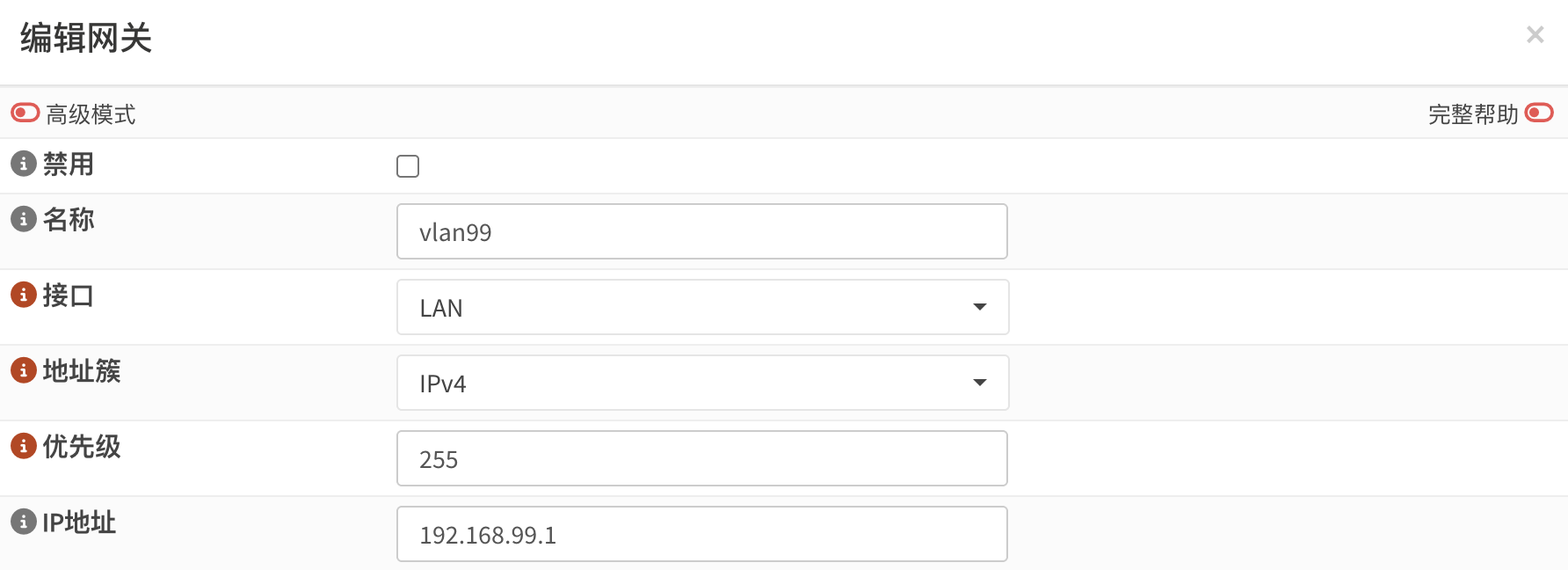
3. 添加回程路由
转到 系统 > 路由 > 配置,添加三条回程路由。
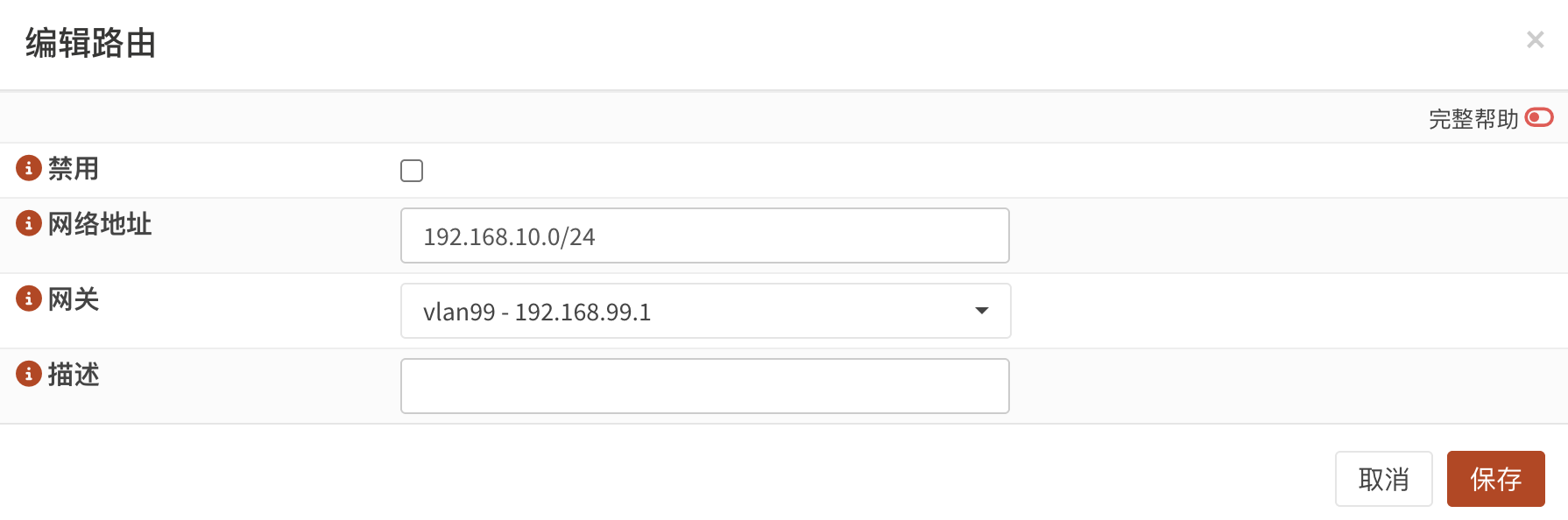
其他两条回程路由类似。
4. 添加防火墙规则
转到 防火墙 > 规则 > LAN,添加一条 any to any 规则。注意这里的源不能为 LAN NET,必须为 any,或者 VLAN 的子网。
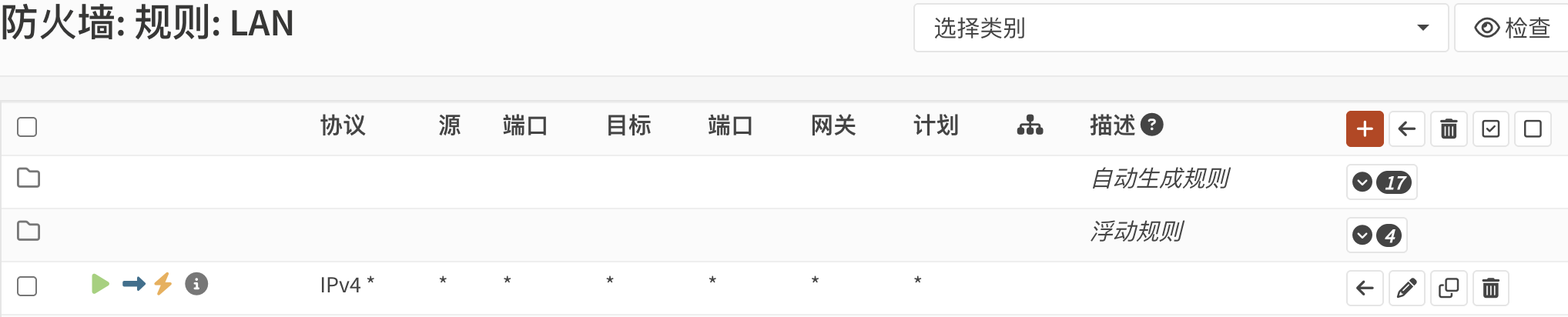
5. 添加出站规则
与 pfSense 在添加静态路由后会自动添加出站规则不同,OPNsense 需要手动添加出站规则。
转到 防火墙 > NAT > 出站,将出站模式改为 混合出站,然后添加以下出站规则:

现在,VLAN 间路由在三层交换机上配置完成,每个 VLAN 网络上的主机都可以通过 OPNsense 防火墙访问互联网。
注意事项
- 只能在三层交换机上创建 ACL(访问控制列表)来限制每个 VLAN 之间的流量,而不是在 OPNsense 上使用防火墙规则来进行控制。
- 在三层交换机上添加其他的 VLAN SVI 时,需要同时在 OPNsense 添加必要的静态路由和防火墙/NAT 规则,以便可以进行 Internet 访问。
觉得内容不错?我要